

Deadline is fast approaching. Windows 11 may become insecure.
Each year, Microsoft releases a significant update for Windows 11 and discontinues support for previous versions. This update usually combines the minor updates and patches implemented throughout the year and adds new features.
On 8th October 2024, you’ll need to use the 2023 (23H2) update at the latest. This is because support for older versions will cease, and you will no longer receive regular fixes and patches.
Why update at all?
Updates aim to fix faults or security flaws in Microsoft’s products that cybercriminals may use to compromise or “hack” your devices.
Performance may also improve if memory leaks or other faults are fixed.
Get the most out of your computer; apply updates to benefit from the added features.
Once updates are released, it announces to the bad guys that.
How do I update Windows 11?
Easy:
- Click your Start Menu Icon (Window Icon), and in the search box, type “Updates.”
- Choose “Check Windows Updates”
- Click the blue “Check for updates” button
- After a quick check, your computer will let you know if updates are required; click Install, and it goes off.
Backup.
Before running updates, we recommend saving open files and ensuring that your backup has run successfully.
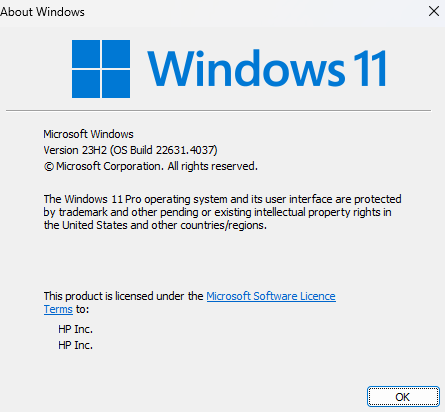
How do I check which version I’m currently running?
- Click your Start Menu Icon (Window Icon), and in the search box, type “winter.” Press enter.
- The following pop-up box will show you which version you are running.
IT Support.
With professional IT support, you can be assured that your devices will be updated and secured automatically, protecting you, your customers, and your business from data loss and other forms of cybercrime.
Thanks for reading.
If you have any IT gremlins that you’d like to talk through for some simple honest effective advice get in touch.